

🏠💻Why the Wi-Fi signal at your kitchen table matters as much as the server rack downtown — and how to know if yours can handle it.
By the Consulteks Team, IT Support & Cybersecurity Consultants Serving Southern NJ, Eastern PA & Northern DE
If you’re running a small business from your home in the NJ/PA/DE corridor, you’ve likely noticed a shift lately. The days of “just making it work” with a retail router and a laptop on the kitchen table are officially behind us.
The Kitchen Table Is Load-Bearing Now
A router in a Cherry Hill kitchen and a server rack in a Philadelphia data center used to live in different worlds. One got a maintenance contract, redundant power, and a technician on call. The other got shoved behind a coffee maker and forgotten about until the Zoom call froze.
That gap doesn’t make sense anymore. If a laptop at that kitchen table is closing deals, filing invoices, or pulling up a client’s financial records, the connection carrying that traffic is business infrastructure — full stop. The short answer to the question in the headline: no, most home networks are not reliable enough for the work now running through them, and the reason isn’t bad luck. It’s that almost nobody has ever evaluated a home network the way they’d evaluate a business one — for uptime, redundancy, and security, not just speed.
That’s the shift this article is about. We call it the Borderless Workspace: the idea that your network no longer has a wall around it. It starts wherever someone opens a laptop — a job site, a home office, a kitchen table — and every one of those places deserves the same design thinking that used to be reserved for a server room.
Key Takeaways
- A home network now carries the same business risk as office infrastructure, but rarely gets the same design attention.
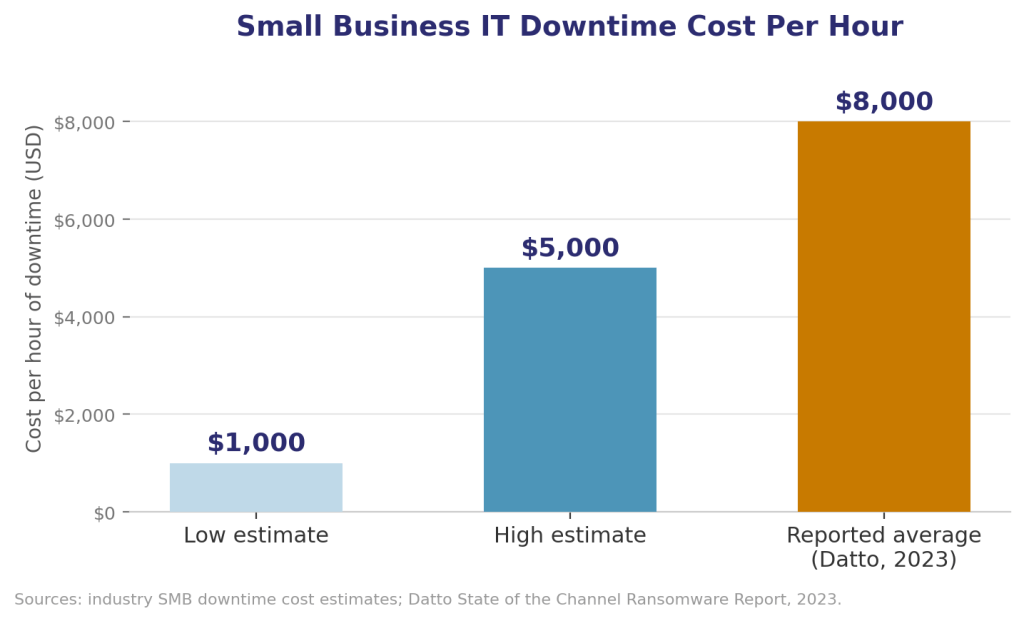
- Small business downtime already costs real money — commonly $1,000 to $5,000+ per hour — and a flaky home connection creates the same losses in smaller, more frequent doses.
- Popular video platforms start degrading at shockingly low packet loss; Google Meet can visibly suffer at just 1% loss, long before most people would notice anything is “wrong” with their internet.
- Home networks have become a top attack vector precisely because they don’t get office-grade security, monitoring, or visibility.
A handful of concrete, affordable upgrades close most of the gap between a hobbyist home router and true business-grade reliability.
Why Do Businesses Still Treat Home Networks Like an Afterthought?
We’ve sat across the table from enough business owners to know the pattern by heart. A company will spend real money on a firewall, a managed switch, and a backup internet line for the office — and then let ten remote employees connect to client systems through whatever router the cable company handed them at install. Nobody signed off on that decision. It just happened, one work-from-home arrangement at a time, until it was the default.
The scale of that default is bigger than most owners realize. National survey data from Gallup now puts 52% of remote-capable U.S. employees in hybrid arrangements and another 27% fully remote — meaning only about one in five remote-capable workers is still fully on-site. Hybrid work isn’t the exception anymore; it’s the baseline org chart. And for small businesses in particular, that baseline runs straight through home routers with no IT department watching them.
We’ve watched this play out with clients directly: a landscaping company that could route a crew’s job-site photos flawlessly but lost an entire afternoon of scheduling software access because an owner’s home router dropped mid-storm. A law office that kept its server room locked down tight, while a paralegal working from home was pulling client files over a network shared with three streaming devices and a kid’s gaming console. Neither business had a “bad” IT setup. They just hadn’t extended the same standards past the office door.
The honest problem isn’t that home networks are unreliable by nature. It’s that nobody has been treating them as infrastructure worth designing — until something breaks, and then it’s suddenly everyone’s emergency.
What Does the Data Say About Network Reliability and Remote Work?
None of this is guesswork. The numbers make the case plainly.
Downtime is expensive, even at small-business scale. Datto’s State of the Channel research puts the average SMB downtime cost at roughly $8,000 per hour, and broader industry estimates commonly put the range for small businesses between $1,000 and $5,000 per hour once you count lost productivity, missed deadlines, and recovery time. That math doesn’t require an office-wide outage to bite. A single remote employee locked out of client systems for an afternoon is a smaller version of the same loss, and it happens more often than a full-blown incident ever will.
.
The office isn't a place anymore — It's wherever your data is — and it deserves the same protection either way.
How Do You Actually Build a Reliable Home Network for Work?
This doesn’t require an enterprise budget. It requires doing a handful of things intentionally instead of accepting whatever showed up in the install box.
- Test your connection during actual work hours, not at 2 a.m. Run a speed and latency test while your household’s normal daytime traffic is happening — kids on tablets, someone streaming, a smart thermostat checking in. That’s the real number your work depends on, not the best-case number on your bill.
- Get your router off the floor and out of the closet. Signal strength drops fast through walls, appliances, and floors. Moving a router to a central, elevated location can solve “unreliable Wi-Fi” faster and cheaper than any hardware upgrade.
- Add a backup connection for anything client-facing. A dual-WAN router with a cellular failover means your primary internet dropping becomes a non-event instead of a canceled meeting. This is the single highest-leverage fix for anyone whose income depends on being reachable.
- Separate work traffic from everything else on the network. Put work devices on their own network segment or VLAN, away from smart TVs, gaming consoles, and IoT devices. This protects both your bandwidth and your security posture — one compromised smart bulb shouldn’t be a path to your client files.
- Turn on MFA and a real VPN, not just a password. A strong Wi-Fi password protects the network from strangers in the driveway. It does nothing to protect the data once someone’s device is compromised. Multi-factor authentication and a properly configured VPN close that gap.
- Keep firmware and router software current. Most consumer routers don’t auto-update. An outdated router is one of the quieter security risks in a home office, and updating it takes minutes, not hours.
- Get a professional network assessment before you assume you’re fine. A trained eye can spot a weak signal zone, an unsegmented network, or a missing failover in about the time it takes to walk through a house. That’s usually the fastest way to find out exactly where the gap is, instead of guessing.
None of these steps require ripping out your existing setup. They require treating the home network as a system worth designing, not a box you plug in once and ignore.
.
Frequently Asked Questions
What internet speed do I actually need for reliable remote work?
Speed matters less than stability. A connection with 25–50 Mbps but low latency and minimal packet loss will outperform a much faster connection that drops packets under load. For video-heavy work, prioritize a stable, low-latency connection over a headline speed number.
Is a mesh Wi-Fi system enough for a home office?
Consumer mesh systems solve coverage well but rarely include business-grade security features like network segmentation or advanced traffic prioritization. They’re a good start, not a complete solution, for anyone handling sensitive client data from home.
Do I really need a VPN if my home Wi-Fi has a password?
Yes. A Wi-Fi password protects who can join your network; it does nothing once a device on that network is compromised. A VPN encrypts the data itself, which matters far more for protecting client and business information.
How much does a professional home network upgrade typically cost?
Costs vary by home size and existing setup, but most reliability and security upgrades — router replacement, failover setup, network segmentation — land well below what a single hour of business downtime tends to cost. It’s usually a one-time investment that pays for itself the first time it prevents an outage.
Is this only relevant for fully remote employees?
No. Hybrid workers, small business owners running operations from home, and high-end residential clients with home offices all carry the same exposure. Anyone accessing business systems from a home network benefits from treating it as real infrastructure.
Consulteks provides IT strategy, network design, and cybersecurity support to small businesses, remote teams, and residential clients across Southern New Jersey, Eastern Pennsylvania, and Northern Delaware. From server rooms to job sites to home offices, we build network infrastructure that holds up under real-world conditions — not just on paper.
[Learn About Our Services] | [Schedule a Free Consultation]
Join our email list
Get the latest IT updates with our insights. Subscribe to our email list for trends, analysis, and special offers from Consulteks Solutions Group
By clicking Sign Up you’re confirming that you agree with our Terms and Conditions.